The Java if statement is used to test the condition. It checks boolean condition: true or false. There are various types of if statement in Java.
- if statement
- if-else statement
- if-else-if ladder
- nested if statement
Java if Statement
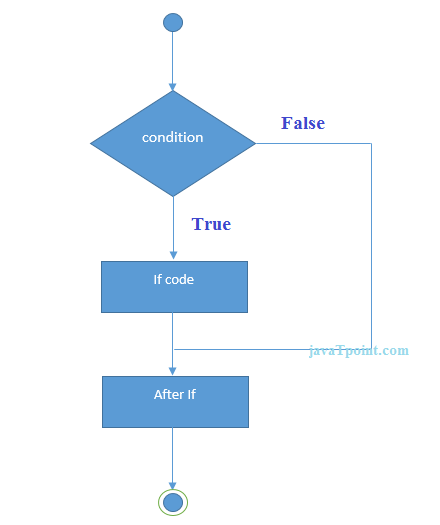
The Java if statement tests the condition. It executes the if block if condition is true.
Syntax:
Example:
-
- public class IfExample {
- public static void main(String[] args) {
-
- int age=20;
-
- if(age>18){
- System.out.print("Age is greater than 18");
- }
- }
- }
Test it Now
Output:
Java if-else Statement
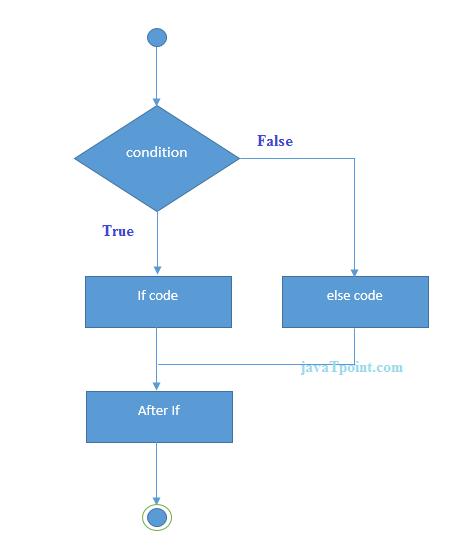
The Java if-else statement also tests the condition. It executes the if block if condition is true otherwise else block is executed.
Syntax:
Example:
-
-
- public class IfElseExample {
- public static void main(String[] args) {
-
- int number=13;
-
- if(number%2==0){
- System.out.println("even number");
- }else{
- System.out.println("odd number");
- }
- }
- }
Test it Now
Output:
Leap Year Example:
A year is leap, if it is divisible by 4 and 400. But, not by 100.
- public class LeapYearExample {
- public static void main(String[] args) {
- int year=2020;
- if(((year % 4 ==0) && (year % 100 !=0)) || (year % 400==0)){
- System.out.println("LEAP YEAR");
- }
- else{
- System.out.println("COMMON YEAR");
- }
- }
- }
Output:
Using Ternary Operator
We can also use ternary operator (? :) to perform the task of if...else statement. It is a shorthand way to check the condition. If the condition is true, the result of ? is returned. But, if the condition is false, the result of : is returned.
Example:
- public class IfElseTernaryExample {
- public static void main(String[] args) {
- int number=13;
-
- String output=(number%2==0)?"even number":"odd number";
- System.out.println(output);
- }
- }
Output:
Java if-else-if ladder Statement
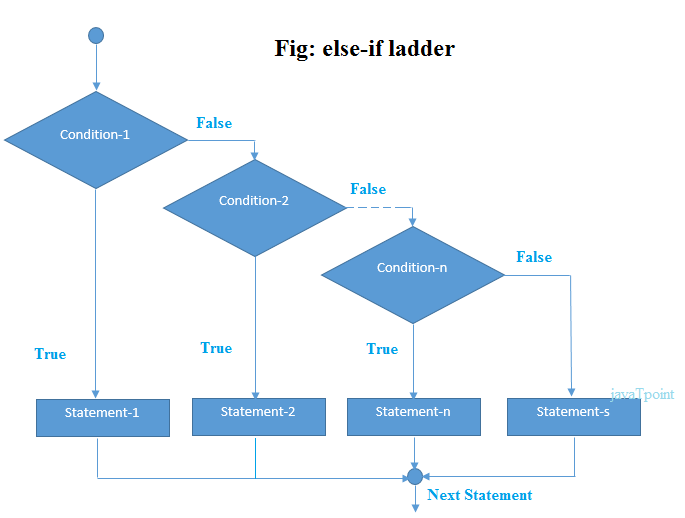
The if-else-if ladder statement executes one condition from multiple statements.
Syntax:
- if(condition1){
-
- }else if(condition2){
-
- }
- else if(condition3){
-
- }
- ...
- else{
-
- }
Example:
-
-
- public class IfElseIfExample {
- public static void main(String[] args) {
- int marks=65;
-
- if(marks<50){
- System.out.println("fail");
- }
- else if(marks>=50 && marks<60){
- System.out.println("D grade");
- }
- else if(marks>=60 && marks<70){
- System.out.println("C grade");
- }
- else if(marks>=70 && marks<80){
- System.out.println("B grade");
- }
- else if(marks>=80 && marks<90){
- System.out.println("A grade");
- }else if(marks>=90 && marks<100){
- System.out.println("A+ grade");
- }else{
- System.out.println("Invalid!");
- }
- }
- }
Output:
Program to check POSITIVE, NEGATIVE or ZERO:
- public class PositiveNegativeExample {
- public static void main(String[] args) {
- int number=-13;
- if(number>0){
- System.out.println("POSITIVE");
- }else if(number<0){
- System.out.println("NEGATIVE");
- }else{
- System.out.println("ZERO");
- }
- }
- }
Output:
Java Nested if statement
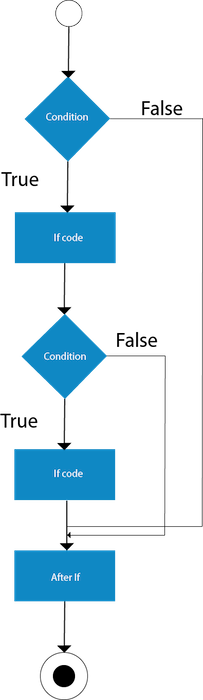
The nested if statement represents the if block within another if block. Here, the inner if block condition executes only when outer if block condition is true.
Syntax:
- if(condition){
-
- if(condition){
-
- }
- }
Example:
-
- public class JavaNestedIfExample {
- public static void main(String[] args) {
-
- int age=20;
- int weight=80;
-
- if(age>=18){
- if(weight>50){
- System.out.println("You are eligible to donate blood");
- }
- }
- }}
Test it Now
Output:
You are eligible to donate blood
Example 2:
-
- public class JavaNestedIfExample2 {
- public static void main(String[] args) {
-
- int age=25;
- int weight=48;
-
- if(age>=18){
- if(weight>50){
- System.out.println("You are eligible to donate blood");
- } else{
- System.out.println("You are not eligible to donate blood");
- }
- } else{
- System.out.println("Age must be greater than 18");
- }
- } }
Test it Now
Output:
You are not eligible to donate blood



