Search Here

Java Switch Statement

 The Java switch statement executes one statement from multiple conditions. It is like if-else-if ladder statement. The switch statement works with byte, short, int, long, enum types, String and some wrapper types like Byte, Short, Int, and Long. Since Java 7, you can use strings in the switch statement.


In other words, the switch statement tests the equality of a variable against multiple values.

Points to Remember

  • There can be one or N number of case values for a switch expression.
  • The case value must be of switch expression type only. The case value must be literal or constant. It doesn't allow variables.
  • The case values must be unique. In case of duplicate value, it renders compile-time error.
  • The Java switch expression must be of byte, short, int, long (with its Wrapper type), enums and string.
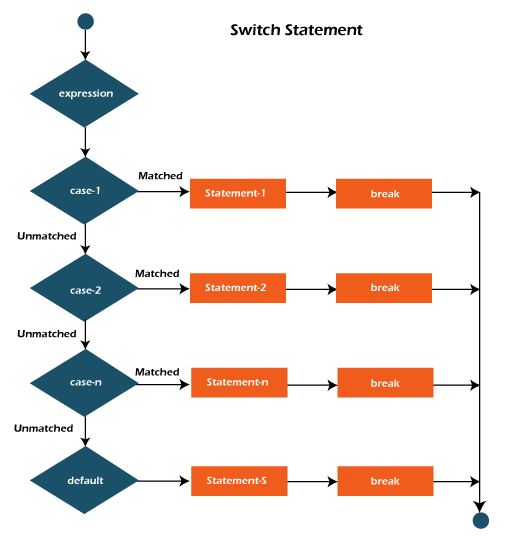
  • Each case statement can have a break statement which is optional. When control reaches to the break statement, it jumps the control after the switch expression. If a break statement is not found, it executes the next case.
  • The case value can have a default label which is optional.

Syntax:

  1. switch(expression){    
  2. case value1:    
  3.  //code to be executed;    
  4.  break;  //optional  
  5. case value2:    
  6.  //code to be executed;    
  7.  break;  //optional  
  8. ......    
  9.     
  10. default:     
  11.   code to be executed if all cases are not matched;  
  12. }    

Flowchart of Switch Statement

flow of switch statement in java

Example:

SwitchExample.java

  1. public class SwitchExample {  
  2. public static void main(String[] args) {  
  3.     //Declaring a variable for switch expression  
  4.     int number=20;  
  5.     //Switch expression  
  6.     switch(number){  
  7.     //Case statements  
  8.     case 10: System.out.println("10");  
  9.     break;  
  10.     case 20: System.out.println("20");  
  11.     break;  
  12.     case 30: System.out.println("30");  
  13.     break;  
  14.     //Default case statement  
  15.     default:System.out.println("Not in 10, 20 or 30");  
  16.     }  
  17. }  
  18. }  
Test it Now

Output:

20

Finding Month Example:

SwitchMonthExample.javaHTML

  1. //Java Program to demonstrate the example of Switch statement  
  2. //where we are printing month name for the given number  
  3. public class SwitchMonthExample {    
  4. public static void main(String[] args) {    
  5.     //Specifying month number  
  6.     int month=7;    
  7.     String monthString="";  
  8.     //Switch statement  
  9.     switch(month){    
  10.     //case statements within the switch block  
  11.     case 1: monthString="1 - January";  
  12.     break;    
  13.     case 2: monthString="2 - February";  
  14.     break;    
  15.     case 3: monthString="3 - March";  
  16.     break;    
  17.     case 4: monthString="4 - April";  
  18.     break;    
  19.     case 5: monthString="5 - May";  
  20.     break;    
  21.     case 6: monthString="6 - June";  
  22.     break;    
  23.     case 7: monthString="7 - July";  
  24.     break;    
  25.     case 8: monthString="8 - August";  
  26.     break;    
  27.     case 9: monthString="9 - September";  
  28.     break;    
  29.     case 10: monthString="10 - October";  
  30.     break;    
  31.     case 11: monthString="11 - November";  
  32.     break;    
  33.     case 12: monthString="12 - December";  
  34.     break;    
  35.     default:System.out.println("Invalid Month!");    
  36.     }    
  37.     //Printing month of the given number  
  38.     System.out.println(monthString);  
  39. }    
  40. }   
Test it Now

Output:

7 - July

Program to check Vowel or Consonant:

If the character is A, E, I, O, or U, it is vowel otherwise consonant. It is not case-sensitive.

SwitchVowelExample.java

  1. public class SwitchVowelExample {    
  2. public static void main(String[] args) {    
  3.     char ch='O';    
  4.     switch(ch)  
  5.     {  
  6.         case 'a':   
  7.             System.out.println("Vowel");  
  8.             break;  
  9.         case 'e':   
  10.             System.out.println("Vowel");  
  11.             break;  
  12.         case 'i':   
  13.             System.out.println("Vowel");  
  14.             break;  
  15.         case 'o':   
  16.             System.out.println("Vowel");  
  17.             break;  
  18.         case 'u':   
  19.             System.out.println("Vowel");  
  20.             break;  
  21.         case 'A':   
  22.             System.out.println("Vowel");  
  23.             break;  
  24.         case 'E':   
  25.             System.out.println("Vowel");  
  26.             break;  
  27.         case 'I':   
  28.             System.out.println("Vowel");  
  29.             break;  
  30.         case 'O':   
  31.             System.out.println("Vowel");  
  32.             break;  
  33.         case 'U':   
  34.             System.out.println("Vowel");  
  35.             break;  
  36.         default:   
  37.             System.out.println("Consonant");  
  38.     }  
  39. }    
  40. }   

Output:

Vowel

Java Switch Statement is fall-through

The Java switch statement is fall-through. It means it executes all statements after the first match if a break statement is not present.

Example:

SwitchExample2.java

  1. //Java Switch Example where we are omitting the  
  2. //break statement  
  3. public class SwitchExample2 {  
  4. public static void main(String[] args) {  
  5.     int number=20;  
  6.     //switch expression with int value  
  7.     switch(number){  
  8.     //switch cases without break statements  
  9.     case 10: System.out.println("10");  
  10.     case 20: System.out.println("20");  
  11.     case 30: System.out.println("30");  
  12.     default:System.out.println("Not in 10, 20 or 30");  
  13.     }  
  14. }  
  15. }  
Test it Now

Output:

20
30
Not in 10, 20 or 30

Java Switch Statement with String

Java allows us to use strings in switch expression since Java SE 7. The case statement should be string literal.

Example:

SwitchStringExample.java

  1. //Java Program to demonstrate the use of Java Switch  
  2. //statement with String  
  3. public class SwitchStringExample {    
  4. public static void main(String[] args) {    
  5.     //Declaring String variable  
  6.     String levelString="Expert";  
  7.     int level=0;  
  8.     //Using String in Switch expression  
  9.     switch(levelString){    
  10.     //Using String Literal in Switch case  
  11.     case "Beginner": level=1;  
  12.     break;    
  13.     case "Intermediate": level=2;  
  14.     break;    
  15.     case "Expert": level=3;  
  16.     break;    
  17.     default: level=0;  
  18.     break;  
  19.     }    
  20.     System.out.println("Your Level is: "+level);  
  21. }    
  22. }   
Test it Now

Output:

Your Level is: 3

Java Nested Switch Statement

We can use switch statement inside other switch statement in Java. It is known as nested switch statement.

Example:

NestedSwitchExample.java

  1. //Java Program to demonstrate the use of Java Nested Switch  
  2. public class NestedSwitchExample {    
  3.     public static void main(String args[])  
  4.       {  
  5.       //C - CSE, E - ECE, M - Mechanical  
  6.         char branch = 'C';                 
  7.         int collegeYear = 4;  
  8.         switch( collegeYear )  
  9.         {  
  10.             case 1:  
  11.                 System.out.println("English, Maths, Science");  
  12.                 break;  
  13.             case 2:  
  14.                 switch( branch )   
  15.                 {  
  16.                     case 'C':  
  17.                         System.out.println("Operating System, Java, Data Structure");  
  18.                         break;  
  19.                     case 'E':  
  20.                         System.out.println("Micro processors, Logic switching theory");  
  21.                         break;  
  22.                     case 'M':  
  23.                         System.out.println("Drawing, Manufacturing Machines");  
  24.                         break;  
  25.                 }  
  26.                 break;  
  27.             case 3:  
  28.                 switch( branch )   
  29.                 {  
  30.                     case 'C':  
  31.                         System.out.println("Computer Organization, MultiMedia");  
  32.                         break;  
  33.                     case 'E':  
  34.                         System.out.println("Fundamentals of Logic Design, Microelectronics");  
  35.                         break;  
  36.                     case 'M':  
  37.                         System.out.println("Internal Combustion Engines, Mechanical Vibration");  
  38.                         break;  
  39.                 }  
  40.                 break;  
  41.             case 4:  
  42.                 switch( branch )   
  43.                 {  
  44.                     case 'C':  
  45.                         System.out.println("Data Communication and Networks, MultiMedia");  
  46.                         break;  
  47.                     case 'E':  
  48.                         System.out.println("Embedded System, Image Processing");  
  49.                         break;  
  50.                     case 'M':  
  51.                         System.out.println("Production Technology, Thermal Engineering");  
  52.                         break;  
  53.                 }  
  54.                 break;  
  55.         }  
  56.     }  
  57. }  
Test it Now

Output:

Data Communication and Networks, MultiMedia

Java Enum in Switch Statement

Java allows us to use enum in switch statement. Java enum is a class that represent the group of constants. (immutable such as final variables). We use the keyword enum and put the constants in curly braces separated by comma.

Example:

JavaSwitchEnumExample.java

  1. //Java Program to demonstrate the use of Enum  
  2. //in switch statement  
  3. public class JavaSwitchEnumExample {      
  4.        public enum Day {  Sun, Mon, Tue, Wed, Thu, Fri, Sat  }    
  5.        public static void main(String args[])    
  6.        {    
  7.          Day[] DayNow = Day.values();    
  8.            for (Day Now : DayNow)    
  9.            {    
  10.                 switch (Now)    
  11.                 {    
  12.                     case Sun:    
  13.                         System.out.println("Sunday");    
  14.                         break;    
  15.                     case Mon:    
  16.                         System.out.println("Monday");    
  17.                         break;    
  18.                     case Tue:    
  19.                         System.out.println("Tuesday");    
  20.                         break;         
  21.                     case Wed:    
  22.                         System.out.println("Wednesday");    
  23.                         break;    
  24.                     case Thu:    
  25.                         System.out.println("Thursday");    
  26.                         break;    
  27.                     case Fri:    
  28.                         System.out.println("Friday");    
  29.                         break;    
  30.                     case Sat:    
  31.                         System.out.println("Saturday");    
  32.                         break;    
  33.                 }    
  34.             }    
  35.         }    
  36. }    
Test it Now

Output:

Sunday
Monday
Twesday
Wednesday
Thursday
Friday
Saturday

Java Wrapper in Switch Statement

Java allows us to use four wrapper classes: Byte, Short, Integer and Long in switch statement.

Example:

WrapperInSwitchCaseExample.java

  1. //Java Program to demonstrate the use of Wrapper class  
  2. //in switch statement  
  3. public class WrapperInSwitchCaseExample {       
  4.        public static void main(String args[])  
  5.        {         
  6.             Integer age = 18;        
  7.             switch (age)  
  8.             {  
  9.                 case (16):            
  10.                     System.out.println("You are under 18.");  
  11.                     break;  
  12.                 case (18):                
  13.                     System.out.println("You are eligible for vote.");  
  14.                     break;  
  15.                 case (65):                
  16.                     System.out.println("You are senior citizen.");  
  17.                     break;  
  18.                 default:  
  19.                     System.out.println("Please give the valid age.");  
  20.                     break;  
  21.             }             
  22.         }  
  23. }  
Test it Now

Output:

You are eligible for vote.

Next TopicJava For Loop


 For Videos Join Our Youtube Channel: Join Now


Post a Comment

0 Comments
* Please Don't Spam Here. All the Comments are Reviewed by Admin.

Top Post Ad

Below Post Ad

Ads Section

