

The Java for loop is used to iterate a part of the program several times. If the number of iteration is fixed, it is recommended to use for loop.

There are three types of for loops in Java.
- Simple for Loop
- For-each or Enhanced for Loop
- Labeled for Loop
Java Simple for Loop
A simple for loop is the same as C/C++. We can initialize the variable, check condition and increment/decrement value. It consists of four parts:
- Initialization: It is the initial condition which is executed once when the loop starts. Here, we can initialize the variable, or we can use an already initialized variable. It is an optional condition.
- Condition: It is the second condition which is executed each time to test the condition of the loop. It continues execution until the condition is false. It must return boolean value either true or false. It is an optional condition.
- Increment/Decrement: It increments or decrements the variable value. It is an optional condition.
- Statement: The statement of the loop is executed each time until the second condition is false.
Syntax:
Flowchart:
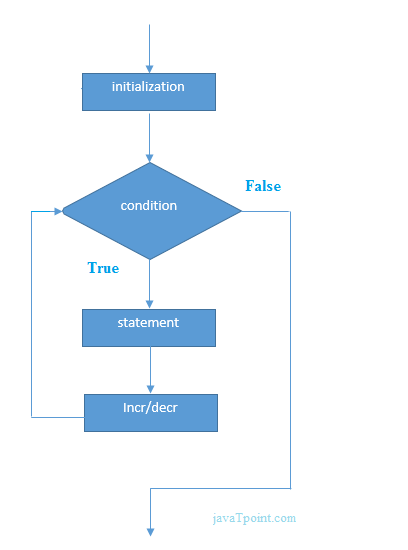
Example:
ForExample.java
Output:
1
2
3
4
5
6
7
8
9
10
Java Nested for Loop
If we have a for loop inside the another loop, it is known as nested for loop. The inner loop executes completely whenever outer loop executes.
Example:
NestedForExample.java
Output:
1 1
1 2
1 3
2 1
2 2
2 3
3 1
3 2
3 3
Pyramid Example 1:
PyramidExample.java
Output:
*
* *
* * *
* * * *
* * * * *
Pyramid Example 2:
PyramidExample2.java
Output:
* * * * * *
* * * * *
* * * *
* * *
* *
*
Java for-each Loop
The for-each loop is used to traverse array or collection in Java. It is easier to use than simple for loop because we don't need to increment value and use subscript notation.
It works on the basis of elements and not the index. It returns element one by one in the defined variable.
Syntax:
Example:
ForEachExample.java
Output:
12
23
44
56
78
Java Labeled For Loop
We can have a name of each Java for loop. To do so, we use label before the for loop. It is useful while using the nested for loop as we can break/continue specific for loop.
Note: The break and continue keywords breaks or continues the innermost for loop respectively.
Syntax:
Example:
LabeledForExample.java
Output:
1 1
1 2
1 3
2 1
If you use break bb;, it will break inner loop only which is the default behaviour of any loop.
LabeledForExample2.java
Output:
1 1
1 2
1 3
2 1
3 1
3 2
3 3
Java Infinitive for Loop
If you use two semicolons ;; in the for loop, it will be infinitive for loop.
Syntax:
Example:
ForExample.java
Output:
infinitive loop
infinitive loop
infinitive loop
infinitive loop
infinitive loop
ctrl+c
Now, you need to press ctrl+c to exit from the program.
Java for Loop vs while Loop vs do-while Loop
| Comparison | for loop | while loop | do-while loop |
|---|---|---|---|
| Introduction | The Java for loop is a control flow statement that iterates a part of the programs multiple times. | The Java while loop is a control flow statement that executes a part of the programs repeatedly on the basis of given boolean condition. | The Java do while loop is a control flow statement that executes a part of the programs at least once and the further execution depends upon the given boolean condition. |
| When to use | If the number of iteration is fixed, it is recommended to use for loop. | If the number of iteration is not fixed, it is recommended to use while loop. | If the number of iteration is not fixed and you must have to execute the loop at least once, it is recommended to use the do-while loop. |
| Syntax | for(init;condition;incr/decr){ // code to be executed } | while(condition){ //code to be executed } | do{ //code to be executed }while(condition); |
| Example | //for loop for(int i=1;i<=10;i++){ System.out.println(i); } | //while loop int i=1; while(i<=10){ System.out.println(i); i++; } | //do-while loop int i=1; do{ System.out.println(i); i++; }while(i<=10); |
| Syntax for infinitive loop | for(;;){ //code to be executed } | while(true){ //code to be executed } | do{ //code to be executed }while(true); |

